
It’s the 27th of the month and your billing partner still hasn’t approved last week’s time entries. Invoices are late again, realisation is slipping, and nobody can tell you why utilization dropped last quarter. If that sounds familiar, cloud based legal billing software is usually the first place to look.
That gap between work done and cash collected is exactly what cloud based legal billing software is built to close. The right system gets time captured at the source, bills out the door faster, and gives partners a real-time read on where the money’s leaking.
Why Firms Switch to Cloud Based Legal Billing Software
Desktop billing tools like older versions of Tabs3 or on-premise PCLaw installs do the job, until they don’t. Updates require an IT visit. Remote associates can’t log time without a VPN. And when the server goes down, so does your entire billing cycle.

A small litigation firm running six attorneys on a local server often finds this out the hard way during a ransomware scare or a hardware failure. One corrupted database, and three months of unbilled time becomes a forensic recovery project instead of an invoice.
Cloud platforms remove that single point of failure. Data lives on the vendor’s infrastructure, usually backed by Amazon Web Services or similar providers, with automatic backups and uptime guarantees written into the contract. Attorneys log time from a phone in the courthouse hallway, and it syncs the moment they hit save.
The bigger shift is behavioral, not technical. When time entry takes ten seconds instead of five minutes at week’s end, lawyers actually do it daily. That alone can lift captured time by a meaningful margin, because memory-based billing at 5pm on Friday is notoriously lossy.
Cloud Based Legal Billing Software Features That Move the Needle
Not every feature on a vendor’s spec sheet matters equally. Here’s what separates billing software that pays for itself from software that just looks good in a demo.
Timers tied to actual work are the foundation. A built-in timer that starts when you open a document or email, like the integrations Clio offers with Microsoft Outlook and Gmail, catches billable minutes that would otherwise evaporate. Firms billing at $350 to $600 an hour lose real money on every uncaptured six-minute increment.
Trust accounting matters just as much, and it’s where generalist tools fail completely. Legal-specific platforms enforce three-way reconciliation between the trust ledger, the bank statement, and client balances, which most state bar rules require. QuickBooks alone can’t do this; it needs a legal-specific layer like LeanLaw sitting on top.
Custom billing rules are the third pillar. Flat fees, contingency matters, blended rates, and capped engagements all need to coexist in one system without manual spreadsheet workarounds. A family law practice running flat-fee divorces alongside hourly custody litigation needs both billing models live in the same client file, not two separate tools.
Finally, look at reporting depth. Realisation rate (billed versus worked value) and utilization rate (billable hours versus total hours available) should be dashboard numbers, not quarterly spreadsheet exports your office manager builds by hand.
Comparing Two Common Deployment Paths
Firms generally land on one of two setups. Here’s an honest look at both.
Option A: All-in-One Practice Management Suite
Platforms like Clio, MyCase, and PracticePanther bundle billing with case management, document storage, and client intake in one subscription. You get a single login, one vendor to call, and billing data that’s already linked to matter details and time entries.
The tradeoff is depth. Billing modules in all-in-one suites are capable but rarely match the granularity of a dedicated accounting engine, especially for complex trust accounting scenarios or multi-entity firms. A 15-attorney firm with three trust accounts across two states may find the built-in reporting too shallow for their compliance needs.
Option B: Dedicated Billing Add-On
Tools like LeanLaw or TimeSolv focus purely on time, billing, and trust accounting, often integrating with QuickBooks Online for the general ledger side. You get deeper rate rules, more granular LEDES billing code support for insurance defense work, and stronger audit trails.
The cost is complexity. You’re now running two systems, your practice management tool and your billing engine, and someone has to own the integration. For a firm without a dedicated ops person, that’s an extra point of failure, not a convenience.
Which path wins depends on firm size and matter complexity. A five-lawyer general practice rarely needs Option B. A 20-attorney insurance defense shop billing LEDES codes to corporate clients almost always does.
Five Platforms Worth Shortlisting
Before comparing features line by line, here’s a quick-reference list of where each platform actually earns its place.
- Clio – best overall for firms wanting one platform for billing, case management, and client intake, with the widest app marketplace for add-ons.
- MyCase – strong middle-market choice with solid client portal and payment features at a lower learning curve than Clio.
- LeanLaw – best dedicated billing engine for firms already on QuickBooks Online who need deep trust accounting and rate flexibility.
- TimeSolv – built for firms that bill complex engagements, including project budgets and multi-phase matters, with strong LEDES export support.
- PracticePanther – budget-friendly all-in-one option that covers the basics well without the add-on sprawl of larger suites.
| Platform | Billing Model | Trust Accounting | Starting Price Point |
|---|---|---|---|
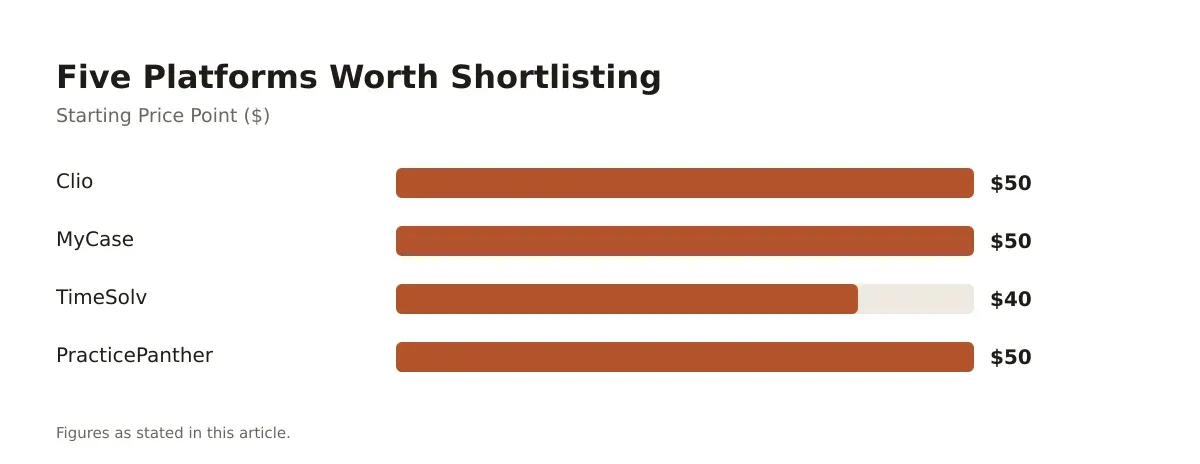
| Clio | Subscription, tiered plans | Built-in, three-way reconciliation | Entry plan under $50/user/month |
| MyCase | Subscription, tiered plans | Built-in | Entry plan under $50/user/month |
| LeanLaw | Subscription, add-on to QuickBooks | Built-in, deep reconciliation tools | Quote-based, scales with timekeepers |
| TimeSolv | Subscription, tiered plans | Built-in | Entry plan under $40/user/month |
| PracticePanther | Subscription, tiered plans | Built-in | Entry plan under $50/user/month |
Prices shift with promotions and annual-versus-monthly billing, so confirm current figures directly with each vendor before signing.
What Migration Actually Looks Like
Switching billing systems mid-year feels risky, and it is, if you do it without a plan. Most of the pain isn’t the software. It’s the data.
Start with historical time entries and open invoices. A firm migrating from desktop Tabs3 to a cloud platform needs every unbilled time entry exported cleanly, matched to the right client and matter codes, before the old system gets switched off. Skip this step and you’ll be chasing lost billable hours for months.
Trust account balances need special care. Reconcile the old ledger to the penny before migration, document the reconciliation, and import opening balances as a single verified entry rather than re-entering transaction history. Most vendors, including Clio and LeanLaw, offer migration support or data import templates specifically for this.
Run parallel for one full billing cycle. Keep the old system read-only and the new one live, so if an invoice looks wrong, you can check the source data without scrambling. A 10-attorney firm doing this typically finds two or three edge cases, like a long-paused contingency matter, that need manual handling before go-live.
Training is the part firms underestimate most. Budget at least two short sessions per role: one for timekeepers on entry habits, one for billing staff on invoice generation and trust transfers. Attorneys who’ve billed the same way for fifteen years need more than a one-page cheat sheet.
Pricing Models and Total Cost of Ownership
The subscription fee on the pricing page is rarely the whole story. Per-user pricing scales with headcount, which sounds obvious until you’re budgeting for seasonal associates or contract attorneys who only need access for a few months.
Payment processing is the hidden line item most firms miss. Platforms that accept credit card and ACH payments through built-in processors, such as Clio Payments or LawPay (which many platforms integrate), typically charge processing fees separately from the subscription. On a firm collecting $80,000 a month in card payments, even a small percentage difference in processing rates adds up over a year.
Add-on modules matter too. Document automation, client intake forms, and advanced reporting sometimes sit behind higher-tier plans or separate per-module fees. A firm that signs up for the base plan expecting full functionality can find itself upgrading within the first quarter once staff start asking for features that were never included.
Implementation and training time carries a real cost even without a line-item invoice. Staff hours spent on setup, data migration, and learning the new workflow are hours not spent on billable work or, worse, overtime hours that show up in the next payroll cycle. Budget for a slower first month rather than assuming instant adoption. If you’re evaluating billing software as part of a broader platform decision, it’s worth reading a comparison of law practice management software options before committing, since billing rarely gets chosen in isolation from case management.
Getting Your Cloud Based Legal Billing Software Decision Right
Cloud based legal billing software isn’t a one-size decision. A solo practitioner billing flat fees needs almost nothing that a 40-attorney insurance defense shop requires, and buying the wrong tier in either direction wastes money and staff patience.
The firms that get the most value treat this as an operations decision, not an IT purchase. They map their actual billing workflows, including trust accounting rules, rate structures, and reporting needs, before they ever book a demo. Then they test the shortlist against real matters, not canned vendor sample data.
Realisation and utilization numbers tell the real story six months after go-live. If billed-to-worked ratios and captured billable hours haven’t improved, the software isn’t the problem, the rollout probably is. Revisit training and entry habits before blaming the platform.
Frequently asked questions
What does cloud based legal billing software typically cost per attorney?
Most platforms price per user on a monthly subscription, with entry-level plans often priced relatively affordably and higher tiers adding trust accounting depth or reporting. Dedicated billing engines like LeanLaw often quote based on timekeeper count and complexity rather than a flat published rate. Always confirm current pricing directly with the vendor since promotions and plan structures change.
Is cloud based billing software secure enough for client trust funds?
Reputable platforms encrypt data in transit and at rest and host on infrastructure like AWS or Microsoft Azure with independent security audits. Trust accounting compliance depends more on your firm’s reconciliation habits than the software itself, since three-way reconciliation still requires someone reviewing the numbers monthly. Check with your state bar for specific technology and recordkeeping requirements before assuming any platform satisfies them automatically.
Can small firms justify switching from spreadsheets to billing software?
A solo or two-attorney firm billing under 20 matters a month can sometimes manage with spreadsheets, but most outgrow that quickly once trust accounting or multiple billing rates enter the picture. The real cost of spreadsheets shows up in uncaptured time and reconciliation errors that are hard to spot until a bar audit. Entry-level cloud plans are often priced low enough that the switch pays for itself in recovered billable hours within a few months.
How long does migrating to a new billing platform usually take?
A straightforward migration for a firm under ten attorneys typically runs two to four weeks, including data export, trust balance reconciliation, and staff training. Larger firms with complex matter histories or multiple trust accounts should plan for six to eight weeks and a full parallel billing cycle. Rushing this step is the most common cause of lost billable time and client invoice disputes after go-live.
Do these platforms integrate with accounting software like QuickBooks?
Yes, most legal billing platforms either include native general ledger functions or sync with QuickBooks Online, since few firms want to run a separate accounting system from scratch. LeanLaw was built specifically as a QuickBooks add-on, while Clio and MyCase offer QuickBooks sync as a feature within their broader suites. Confirm the sync is two-way and real-time before assuming your bookkeeper will see accurate numbers without manual re-entry.